Workflows
Stacked Diffs
Stacked diffs refer to a common version control workflow where instead of large PRs, you have smaller groups of changes one after another which can be code reviewed and approved independently. This helps improve efficiency over being blocked on large PR reviews, and monolithic changes.
It aims to solve the problem when developers write large PRs sequentially (non-independent), one depending on the other. This requires a lot of waiting while the prior PR undergoes review. With stacked diffs, you make smaller changes which you commit as a diff (small PR) and then create another diff, and another. Each diff is reviewed and approved, but you can move on to the next diff instead of waiting on reviews. Breaking large PRs down to smaller diffs also help with the review process.
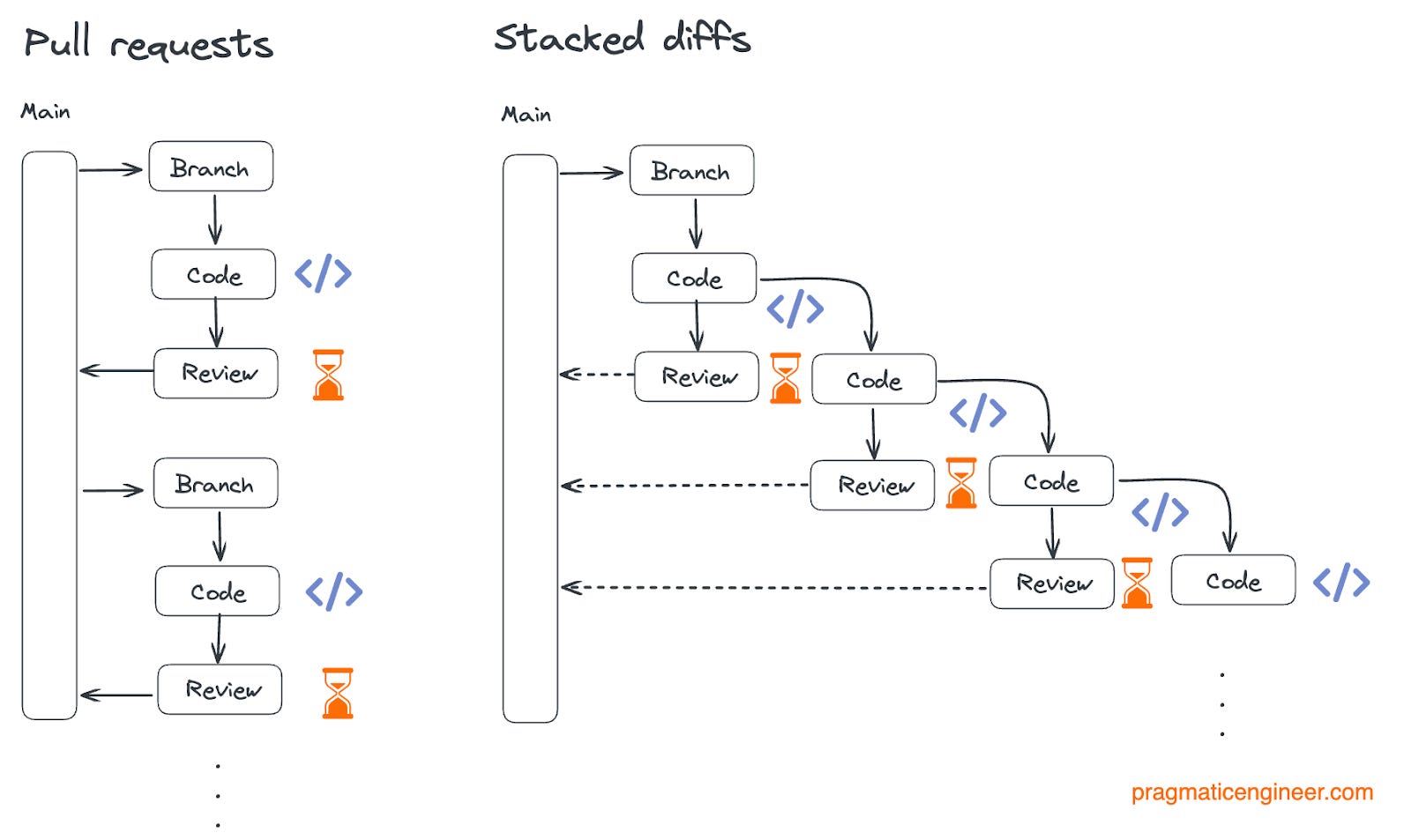
When prior diffs require changes, the later diffs will need to be rebased. Thus interactive rebasing is a big component of a stacked diff workflow
Additional notes:
- Stacked diffs are often supported by specific tooling like
git-stack,Phabricatorand more to help manage its complexity. - Diffs can either depend on prior diffs or be independent. Independent diffs can be reviewed and approved, but dependent ones still need to wait for their prerequisites to merge before they ultimately are merged.
- Stacked diffs typically will use rebase-and-merge (just typical rebase + merge fast forward pattern) rather than merge commits to maintain linear history.
Git Worktrees
What are Git Worktrees?
When you work with Git you usually have:
- One working directory
- One active branch at one time
- Switching branches changes all files in that directory
The worktree model lets you have:
- Multiple working directories from the same repository
- Different branches checked out simultaneously
- Independent work in each directory
Without worktrees you basically will need to checkout one branch at a time and work on one feature at a time. To switch between them you have to stash the current changes and checkout the other branch. Then later come back, git stash pop and restore the previous work state. This causes a lot of context switching overhead and prevents simultaneous development.
Each worktree can be thought of as a parallel universe which shows your project at a specific branch or commit and which does not affect other parallel universes.
To use worktrees, simply start by running:
# Create separate worktrees
git worktree add ../project-feature-a feature-a
git worktree add ../project-feature-b feature-b

# This creates two worktree directories
cd ../project-feature-a
cd ../project-feature-b # work on a different feature in another terminal
When a git worktree is created you have a new directory with all project files. It is linked to the main repository, so shares in the cumulative Git history.
One important constraint is that Git prevents the same branch from being checked out in multiple worktrees. The rule is one branch per worktree.
# works
git worktree add ../repo-feature-a feature-a

# this fails if feature-a has already been checked out
git worktree add ../repo-feature-a-copy feature-a
# Error: 'feature-a' is already checked out
Some important commands to learn:
# List all worktrees
git worktree list

# Remove a completed worktree
git worktree remove ../monolith-feature-123

# cleanup any leftover references
# only necessary if worktrees are manually removed without using worktree remove command
git worktree prune
Recommended to use proper naming conventions so worktrees are clear in terms of their purpose and branch:
# Good worktree names
../monolith-feature-auth           # Feature-based
../monolith-bugfix-12345          # Issue-based
../monolith-hotfix-critical       # Purpose-based
../monolith-experiment-new-arch   # Experiment-based

# Avoid
../temp                           # Too generic
../test                          # Unclear purpose
../monolith                      # Confusing with main
The project can be organized like so:
# Recommended structure
projects/
├── monolith/                    ← Main repository
├── monolith-feature-auth/       ← Feature worktree
├── monolith-feature-payments/   ← Another feature
└── monolith-hotfix-urgent/      ← Hotfix worktree
For more info, consult the source here.